Foundational Learning

AI 101
Fundamentals

Start your AI journey with essential tools, basic prompt engineering, and foundational concepts. Includes reasoning / Thinking models and how supervised AI workflows change daily work.

Start here

Six short cards. One step each. Use the AI tool your employer approved.

101.1 What AI is good at at work

Copilot, ChatGPT, Claude, and Gemini are strong at first drafts, summaries, restructuring messy notes, and explaining things. They are weak at facts they cannot see, numbers without a source, and final judgment.

Do this today: Mark three tasks on this week's calendar as draft, summarize, or analyze. Those are your AI candidates.
101.2 Safe-use basics

Use your work-approved tool, signed in with your work account. Never paste passwords, customer personal data, or confidential numbers into a personal account. A human checks every fact and number before anything is shared.

Do this today: Find your company's AI policy or approved-tools list and write your one-line rule on a sticky note.

101.3 Know where the answer comes from

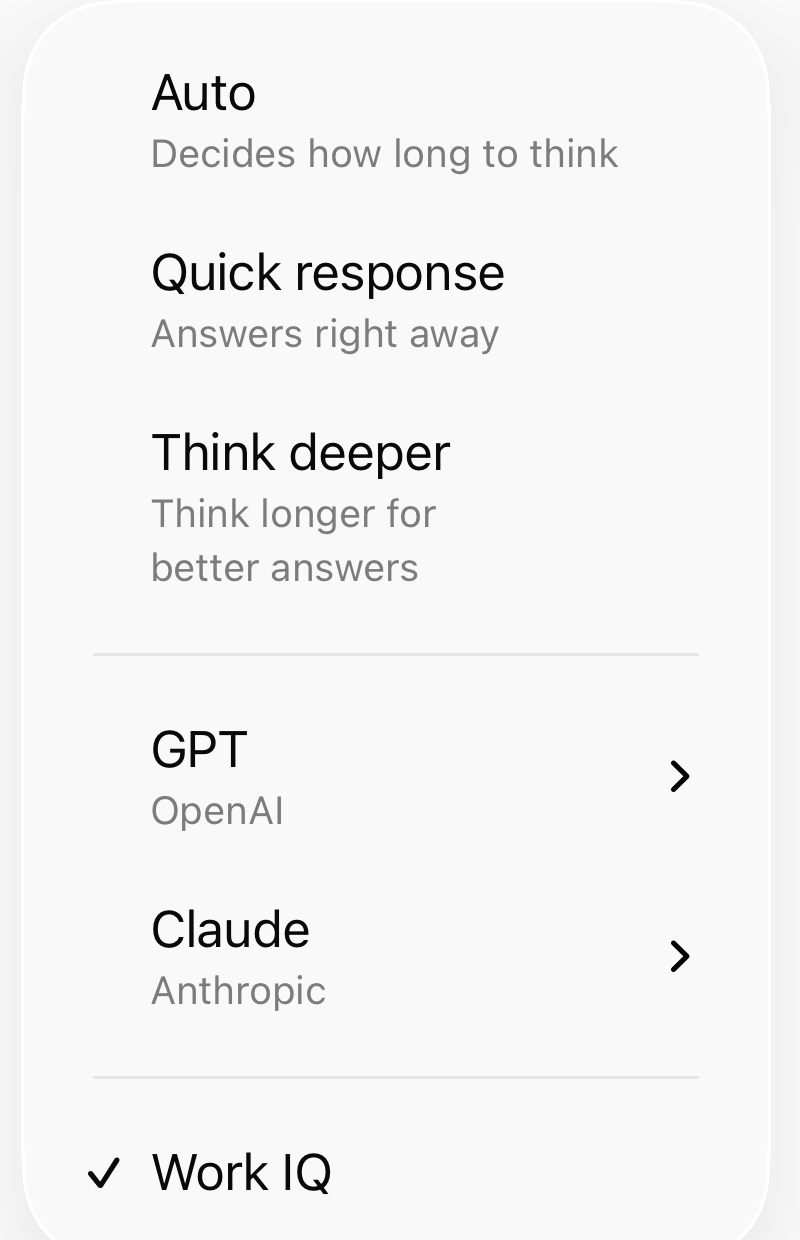
An answer can come from three places: your work data, the public web, or what you attach. In Microsoft 365 Copilot, the Work IQ button controls whether it can read your work data. With it off, Copilot uses the web and what you attach.

Copilot · real screenshot
Copilot model menu with the Work IQ switch. UI may vary by app and license.
  1. Auto, Quick response, Think deeper.
  2. GPT or Claude.
  3. Work IQ.

Do this today: Before your next question, decide: my work, the web, or this file? Set Work IQ to match.

Source

101.4 A prompt that works: goal, context, format, check

Say what you want, give the material, name the shape of the output, and ask what to verify. Four lines beat one long paragraph.

Do this today: Rewrite one prompt you used last week using those four parts. Compare the two answers.

101.5 Your first three workflows

1. Meeting notes into decisions and owners. 2. Rough notes into a status update. 3. A long thread into a short reply draft. All three are frequent, low risk, and easy to check.

Do this today: Run one of the three on real work. Time it, including your review.

101.6 Pick one workflow to prove

Choose one that is weekly, yours, easy to check, and visible to your manager. One workflow done well beats five tried once.

Do this today: Finish this line: "I will use [tool] to [task] every [week], and track minutes and fixes."

Essential AI Tools

Your beginner's starter kit: Get familiar with these tools, download the mobile apps, and create free accounts. Start with 2-3 tools that match your work needs.

✓

Your 3-Step Action Plan:

  1. Get familiar: Click each tool below to visit their website and understand what they do
  2. Download mobile apps: Install the apps on your phone for on-the-go access
  3. Create free accounts: Sign up for 2-3 tools that match your role (start with ChatGPT or Gemini)

🤖 AI Assistants & Chatbots

These tools now support agent-style workflows: multi-step tasks, web search, and file analysis. ChatGPT, Gemini, and Claude can research, summarize, and iterate for you.

AI Search & Research

Writing & Content Creation

Image Generation

Reasoning models

Chat Models vs Reasoning Models

One of the most important things to understand in 2026: not all AI models think the same way. Knowing which to use saves you time and gets better results.

Chat Models

ChatGPT (standard), Claude Sonnet, Gemini

Optimized for fast, conversational back-and-forth. Great for drafting, brainstorming, quick summaries, and iterating on copy.

  • ✓ Fast responses
  • ✓ Great for iteration
  • ✓ Best for creative & writing tasks
  • ✓ Usually free tier available

Reasoning / Thinking Models

ChatGPT Thinking mode, Claude extended thinking

Think step-by-step before answering. Take longer but handle complex analysis, logic, and math much more accurately.

  • ✓ Better for complex analysis
  • ✓ Fewer logic errors
  • ✓ Best for code review, math, decisions
  • ✓ Worth the wait for high-stakes tasks

Quick Reference: Which to Use?

Task Chat Model Reasoning Model
Draft an email ✓ Best Overkill
Complex budget model / forecast May make errors ✓ Best
Brainstorm campaign ideas ✓ Best Slow for this
Debug code / logic OK ✓ Much better
Rewrite / shorten copy ✓ Best Not needed
Multi-step analysis with stakes Risk of errors ✓ Best

Read the full reasoning model guide →

Use fast chat for drafts. Switch to Think / extended thinking for analysis you would send. Use an agent when the job needs files, tools, or multiple steps.

Try your first prompt

Copy the prompt below, paste it into ChatGPT, Gemini, or Claude, and replace [TOPIC] with anything you want to learn. Great way to see how AI explains things clearly.

AI 101

Explain like I'm new

Explain [TOPIC] in simple terms. Use short sentences and one real-world example. At the end, suggest 3 follow-up questions I can ask to go deeper. Best in ChatGPT, Gemini, or Claude.

Explore full Prompt Library

Official Learning Sources

Current vendor-maintained learning hubs from OpenAI, Microsoft, Google, and Anthropic. No recycled old videos, no influencer filler, and no stale model-name cards.

How to use these sources

Pick one official source, complete one lesson or workshop, then create a proof artifact from a real task. The artifact matters more than the certificate: source material, prompt or workflow, AI output, human review, and final result.

Common Questions

Which AI tools should I start with?
Start with 2-3 tools that match your work: ChatGPT or Gemini for general use, Claude for long documents, and Copilot if you use Microsoft 365 daily.
Do I need to pay for AI tools?
No. ChatGPT, Gemini, and Claude all offer free tiers. Start free, then upgrade if you hit limits.

Ready for Advanced Skills?

Once you've mastered the fundamentals, move on to AI 201 for advanced techniques, automation, and building AI-powered applications.